

Connect Quickbooks Online to Salesforce. Fast, Easy & Secure.
QB Connect Professional is the fastest and easiest way to sync your QuickBooks Online and Salesforce accounts. Made by Salesforce consultants, our Pro version gives you the most features at the best price. One hour of free support included!
View on AppExchangeDownload User GuideView User GuideQB Connect is the easiest and most cost-effective AppExchange product to integrate your Quickbooks Online account to your Salesforce Professional, Enterprise or Unlimited account. As a consulting company, Cloud Builders tried all the most popular AppExchange products to connect dozens of client’s Salesforce accounts to Quickbooks Online. We built QB Connect because we saw an opportunity for a better product that was easier to use, had a stronger more flexible integration with Quickbooks, and was affordable. QB Connect incorporates our knowledge of Salesforce design, our knowledge of Quickbooks and our knowledge of the limitations of other Quickbooks integration products.

QB Connect integrates Quickbooks Online directly with Salesforce. We support Professional, Enterprise and Unlimited Editions. Not sure what version you have? Open Salesforce and hover your mouse over your browser tab at the top of your browser. The version will appear in the help text.
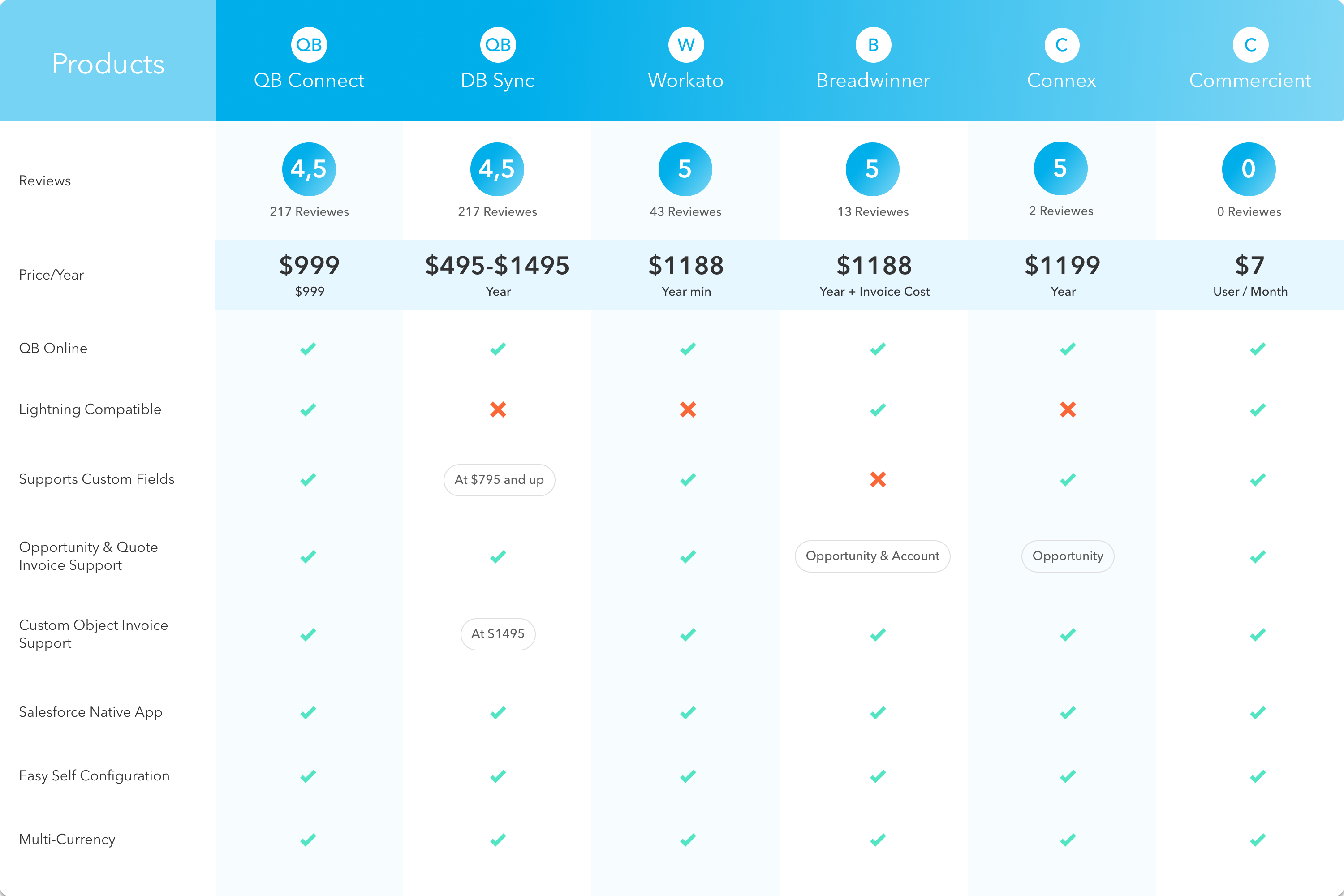
QB Connect works with Salesforce Classic and the new Lighting Interface.
QB Connect allows you to integrate invoices directly with the Salesforce Quote or Opportunity standard objects, or our custom Invoice object. Competing products either do not support more than one object or charge more for doing so.
QB Connect charges a straightforward yearly subscription price. Competing products have hidden fees, use external servers and many have transaction costs on top of the yearly subscription expense.
QB Connect Supports Multiple CurrenciesQB Connect supports all the currencies that Quickbooks Online offers. Setting your currency is easy and fully documented in our Integration Guide.
With each purchase of QB Connect, Cloud Builders offers one hour of support that you can use to assist you in configuration and to answer any questions you may have about integrating Salesforce and Quickbooks online. Our product is both simple to use and easy to configure, but the hour of support is provided as our guarantee of success and something the other products won’t give you, or will charge you for.
Whether your company is new to Salesforce or new to Quickbooks Online, QB Connect enables you to easily sync your historical data. Sync your Salesforce account to your Quickbooks Online customers, or the the other way around. Syncing your historical data is easy with QB Connect and fully documented in our user guide.
Quickbooks Online allows for up to three custom fields. We support direct integration for all three Quickbooks fields should you create them, and mapping is very easy and fully documented in our configuration guide.
Other Quickbooks Online to Salesforce integrations claim to be free or don’t publish their pricing. That’s because they allow for a free download but charge you access to a third party server to connect your two accounts. This not only runs afoul of Salesforce partner terms and conditions, it adds in another layer of exposure to your sensitive financial information. QB Connect is a native Salesforce application (it is code inside your Salesforce organization) that connects directly via api to your Quickbooks online account via an encrypted REST connection. Your data is safe, secure and there are no hidden fees.
QB Connect can easily be configured in three steps:
Download QB Connect from the AppExchange.
Connect to your Quickbooks account.
Authorize the connection. It’s that easy!
Is your business new to both Quickbooks Online and Salesforce? The prospect of setting up two new business software systems can be daunting. QB Connect can help. Not only are we the easiest way for you to connect your two accounts, when you purchase QB Connect it comes with an hour of free consulting. Allow our staff to advise you on best practices and make suggestions on how to configure your accounts so you are positioned for success.
Is Quickbooks Online already part of your business? We can help you with that. Once you have your Quickbooks Online account connected to Salesforce, simply use our historical data sync feature to pull all the information from Quickbooks Online into Salesforce. Let us help you make sure your Salesforce Accounts match your Quickbooks Customers and that your products are priced consistently.
You can use QB Connect to make sure that the business process you built with Quickbooks Online matches up with how you’re utilizing Salesforce. Whether you want Quickbooks invoices to connect to Salesforce Opportunities, Salesforce Quotes, or our custom Invoice object, we make it easy manage your data.
Many of our customers liked being able to generate their invoices in Quickbooks Online rather than Salesforce and QB Connect helps you do that too. No matter where you want to generate your invoices you can quickly and easily generate, then print and mail or email your invoices out to your customers.
If you know your way around Salesforce, but you are new to Quickbooks Online, setting up the Quickbooks Online integration is an easy step-by-step process. With the free hour of support we provide, we can answer any Quickbooks Online questions you may have. After setup and connecting your two accounts, you will be able to sync data from Quickbooks Online to Salesforce and send invoices from both and send them directly to your customers.
If your business is proficient in both Quickbooks Online and Salesforce, great. You already know your way around both systems so setup of QB Connect will take only a few minutes. Download the app, connect Quickbooks Online and Salesforce and then sync your historical data.
You can determine if you want to integrate Quickbooks Online with Opportunities, Quotes or our Invoice object. From there you can generate invoices in Quickbooks Online or in Salesforce and email them directly to your customers.
Cloud Builders provides detailed installation and configuration documentation for all of our products and free support with each purchase. You may download the documentation as a pdf from the links at the top and bottom of the page, or view the full documentation on line here.